
DrayTek 28-Port Gigabit Ethernet PoE/PoE+ Managed Switch 24-port PoE 4x SFP
Out of stock


Features
DrayTek VigorSwitch P1282 is a Web Smart Gigabit PoE switch. It has 24x GbE PoE/PoE+ ports with 400 watts of power budget and 4x GbE/SFP combo ports.
Equipped with enterprise-level features, including IP Conflict Detection & Prevention, ONVIF Surveillance, and ping watchdog, VigorSwitch P1282 is a managed switch that brings network security and stability into mid-sized environments.

ONVIF-Friendly
Recognize the ONVIF devices, display surveillance topology, provide UI for video streaming and device maintenance.

Centralized Hierarchical View
VigorSwitch automatically detects ONVIF devices, and displays the topology of connecting IP cameras and NVRs.
Images Viewing
Images filmed by IP cameras can be viewed directly on VigorSwitch.
Device Management
Support ONVIF devices basic configuration/maintenance remotely via VigorSwitch. Such as remote reboot, factory reset, network settings, etc.

ONVIF Snapshot Alert
Locating Not-Responding Cameras Made Easy
It's already difficult to manage several IP cameras across different locations and customers, not to mention to keep monitoring on which camera stops functioning.
To help on this task, VigorSwitch keeps pinging on the ONVIF IP cameras and taking snapshots from them periodically, and sends out an email alert with the latest snapshot when a camera not responding.
With PoE models, VigorSwitch can also provide first aid to automatically power cycle the particular port to reboot the camera.

IP Conflict Detection & Prevention
Conflict Detection
keeps an eye on the environment and notify the administrator of any IP conflicts.
Conflict Prevention
For a more stable network, VigorSwitch can't only detect but block the misconfigured or malicious IP host.

LAN Device Check
Ping Watchdog for LAN Devices
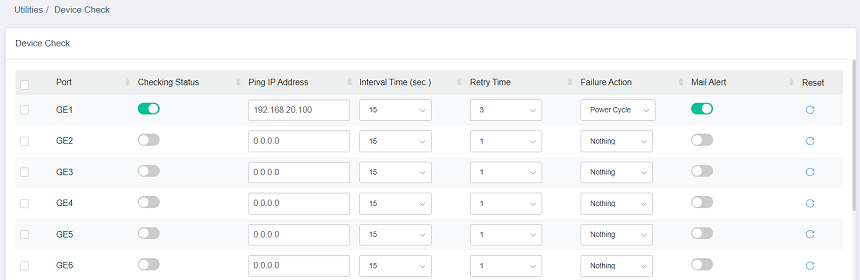
VigorSwitch keeps pinging on the LAN devices. Once the device stop responding to the ping, PoE cycle a port or send email alert.
LAN Management
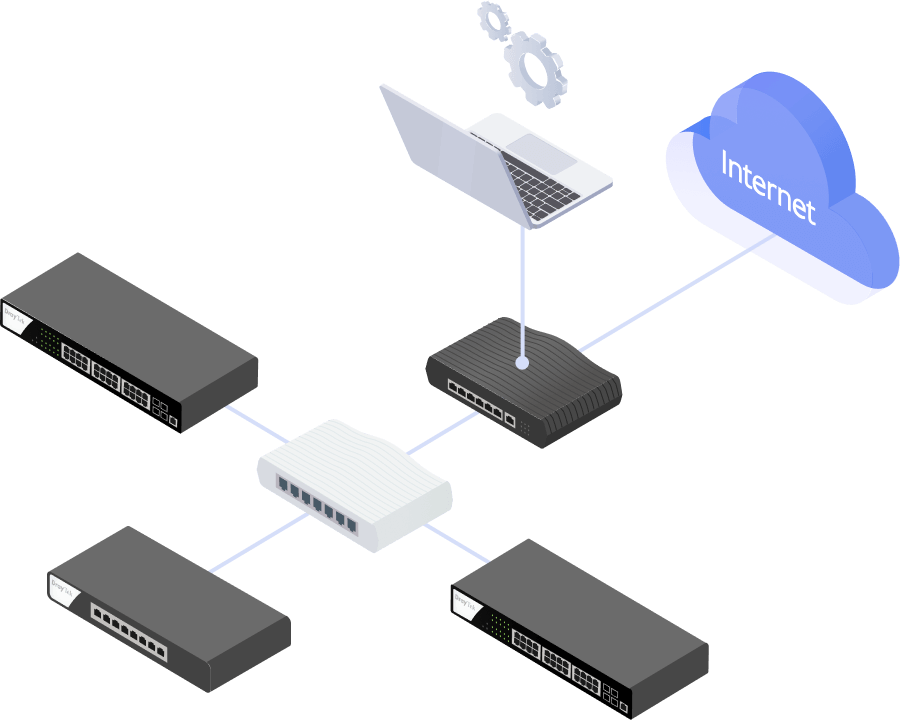
DrayTek provides an all-in-one management platform for Vigor devices on the LAN side.
Automatic Device Discovery
All you need is connect the VigorSwitch to the LAN side of the router, Vigor Router will then discover the devices to be managed.
Provisioning
Switch profile may be set on the Vigor Router. VLAN and scheduled ports control may be set and provision to the VigorSwitch remotely.
Monitoring
VigorRouter provides a hierarchical centralized view of managing devices, you may always check if the managed VigorSwitch is online and if there's log and alert happens.
System Maintenance
You may perform a factory reset, save/restore a configuration backup, or trigger a remote reboot directly on the VigorRouter. There's no need to log in to each device's management page.

Management Solution
All-in-One Management
Vigor Router SWM
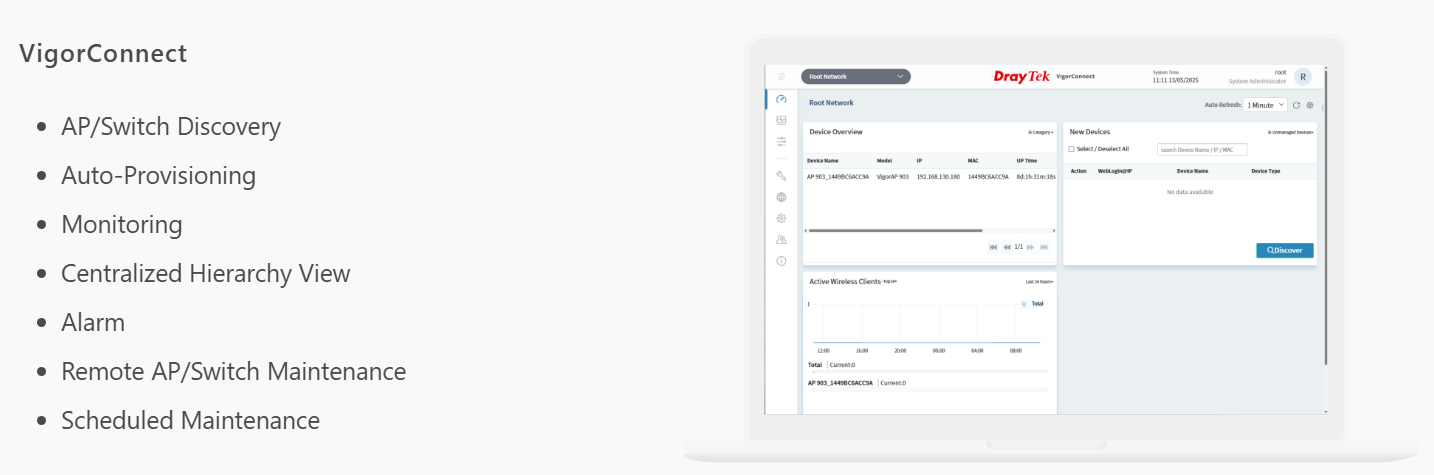
Auto-Discovery, Provisioning, Monitoring, Centralized Hierarchy View, Reboot PoE Devices Remotely, Quick VLAN Configuration
Software Management

Specifications
Reviews
Delivery & Pick-up
Returns & Warranty

DrayTek 28-Port Gigabit Ethernet PoE/PoE+ Managed Switch 24-port PoE 4x SFP
- Brand: DrayTek
- MPN: P1282
- Part #: UNC001003079

Product URL: https://www.pbtech.com/pacific/product/UNC001003079/DrayTek-28-Port-Gigabit-Ethernet-PoEPoE-Managed-Sw
Features
DrayTek VigorSwitch P1282 is a Web Smart Gigabit PoE switch. It has 24x GbE PoE/PoE+ ports with 400 watts of power budget and 4x GbE/SFP combo ports.
Equipped with enterprise-level features, including IP Conflict Detection & Prevention, ONVIF Surveillance, and ping watchdog, VigorSwitch P1282 is a managed switch that brings network security and stability into mid-sized environments.
ONVIF-Friendly
Recognize the ONVIF devices, display surveillance topology, provide UI for video streaming and device maintenance.
Centralized Hierarchical View
VigorSwitch automatically detects ONVIF devices, and displays the topology of connecting IP cameras and NVRs.
Images Viewing
Images filmed by IP cameras can be viewed directly on VigorSwitch.
Device Management
Support ONVIF devices basic configuration/maintenance remotely via VigorSwitch. Such as remote reboot, factory reset, network settings, etc.
ONVIF Snapshot Alert
Locating Not-Responding Cameras Made Easy
It's already difficult to manage several IP cameras across different locations and customers, not to mention to keep monitoring on which camera stops functioning.
To help on this task, VigorSwitch keeps pinging on the ONVIF IP cameras and taking snapshots from them periodically, and sends out an email alert with the latest snapshot when a camera not responding.
With PoE models, VigorSwitch can also provide first aid to automatically power cycle the particular port to reboot the camera.
IP Conflict Detection & Prevention
Conflict Detection
keeps an eye on the environment and notify the administrator of any IP conflicts.
Conflict Prevention
For a more stable network, VigorSwitch can't only detect but block the misconfigured or malicious IP host.
LAN Device Check
Ping Watchdog for LAN Devices
VigorSwitch keeps pinging on the LAN devices. Once the device stop responding to the ping, PoE cycle a port or send email alert.
LAN Management
DrayTek provides an all-in-one management platform for Vigor devices on the LAN side.
Automatic Device Discovery
All you need is connect the VigorSwitch to the LAN side of the router, Vigor Router will then discover the devices to be managed.
Provisioning
Switch profile may be set on the Vigor Router. VLAN and scheduled ports control may be set and provision to the VigorSwitch remotely.
Monitoring
VigorRouter provides a hierarchical centralized view of managing devices, you may always check if the managed VigorSwitch is online and if there's log and alert happens.
System Maintenance
You may perform a factory reset, save/restore a configuration backup, or trigger a remote reboot directly on the VigorRouter. There's no need to log in to each device's management page.
Management Solution
All-in-One Management
Vigor Router SWM
Auto-Discovery, Provisioning, Monitoring, Centralized Hierarchy View, Reboot PoE Devices Remotely, Quick VLAN Configuration
Software Management
Specifications
Performance
Buffer Size (Mbit)
4.2
Switching Capacity (Gbps)
56
Forwarding Rate (64 bytes)(Mpps)
41.7
MAC Address Table
8K
Max. Jumbo Frame (KB)
9
Ports
1 GbE
24
GbE/SFP Combo
4
PoE
PoE+(802.3af/at) Ports
24
PoE Power Budget (watts)
400
Scheduled On/Off
Yes
Standard Compliance
Ethernet Standards
802.3af PoE
802.3at PoE+
802.3 10Base-T
802.3u 100Base-T
802.3ab 1000Base-T
802.1q Tag-based VLAN
802.3x Flow Control
802.3 Auto-Negotiation
802.1p Class of Service
802.1d STP
802.1w RSTP
802.3ad LACP
802.1AB LLDP
802.3az EEE
Spanning Tree
STP
Yes
RSTP
Yes
Link Aggregation
Max. Number of Group
8
Max. Number of Member in Each Group
8
Type
LACP, Static
Traffic Load Balancing
Yes
VLAN
Max. Number of VLAN
512
VLAN Type
802.1q Tag-based VLAN
MAC-based VLAN
Protocol-based VLAN
Management VLAN
Voice VLAN
Surveillance VLAN
Multicast
IGMP Snooping
v2, v3(BISS)
IGMP Querier
Yes
ONVIF Surveillance
Discovery
Yes
Surveillance Topology
Yes
Real-Time Video Streaming
Yes
ONVIF Device Maintenance
Device Info
Network Settings
Time Settings
Reboot
Reset to Factory Default
QoS
Number of QoS Queues
8
Queue Schedule
SPQ, WRR
CoS (Class of Service)
CoS
DSCP
CoS-DSCP
IP Precedence
Rate Limiting
Yes
Security
IP Source Guard
Yes
Traffic Control
DoS Defense, Storm Control
IP Conflict Prevention
Yes
Loop Protection
Yes
Management
Local Service
HTTP
HTTPS
Telnet
SSH v2
Config Backup/Restore
Yes
2-Level Administration Privilege
Yes
Access Control
Access List
OpenVPN Client
Yes
SNMP
v1, v2c, v3
SNTP (Simple Network Time Protocol)
Yes
LLDP
Yes
Mail Alert
Port Status
Port Speed
System Restart
IP Conflict
Hardware Monitor
Device Check
ONVIF IP Cam Snapshot
VigorRouter Management (SWM)
Yes
VigorConnect Management (Since f/w)
V2.7.0
VigorACS Management (Since f/w)
V2.7.0
Physical
Rack Mountable
1U
Power Input
AC 100-240V @ 6.5A
Max. Power Consumption (watts)
460.3
Dimension (mm)
440 x 281.3 x 44
Weight (kg)
4.3
Operating Temperature
0 to 50°C
Storage Temperature
-20 to 70°C
Operating Humidity (non-condensing)
10 to 90%
Storage Humidity (non-condensing)
5 to 90%


