
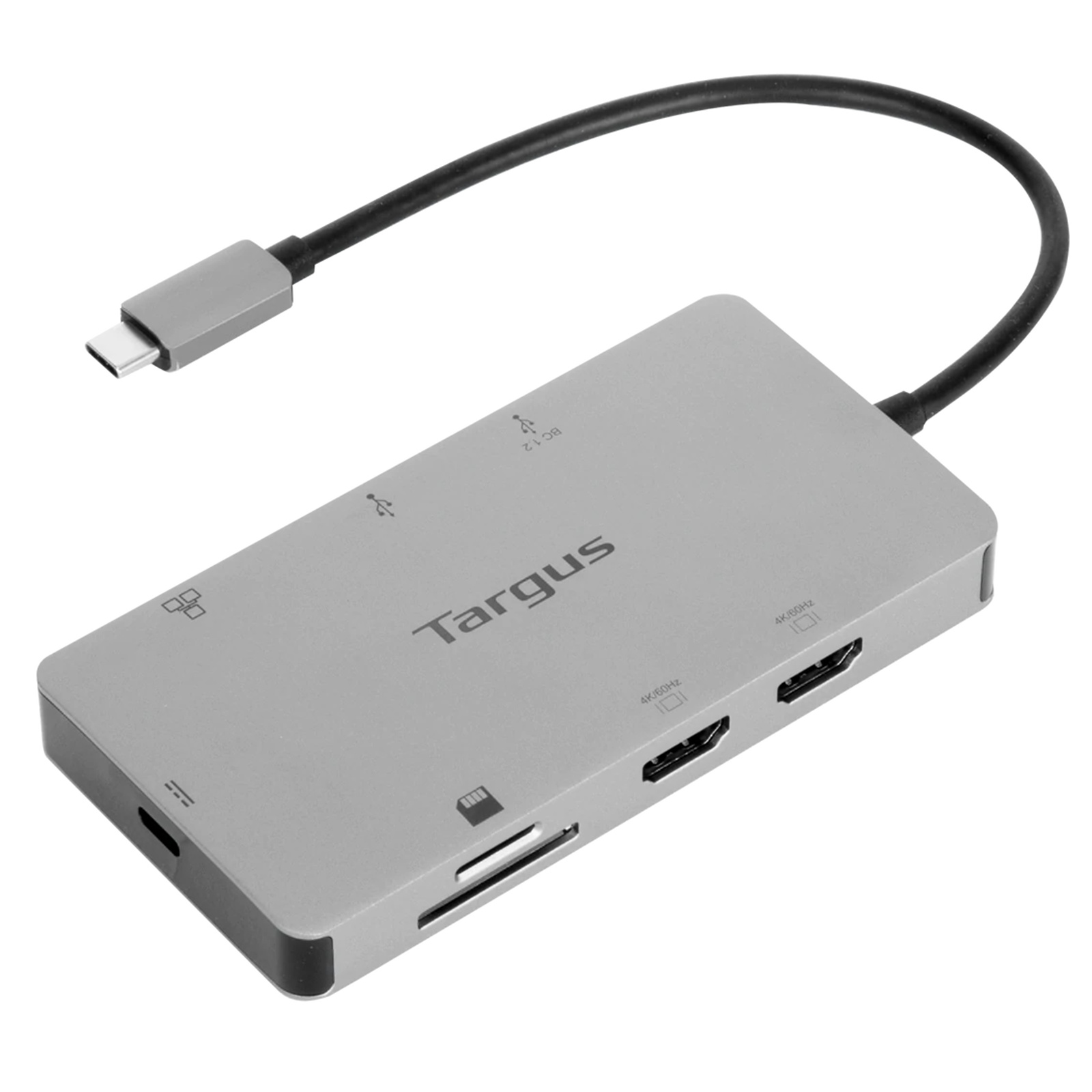
Targus DOCK423 USB-C Dual 4K Alt Mode Mobile Hub with 100w Power Delivery
2x HDMI2.0 - 1x USB-C (for Power in) - 1x USB-C 5Gbps 2x USB-A 5Gbps - 1x RJ45 - Supports Apple / ChromeOS / Linux / Windows - 2Y Warranty
Out of stock
Targus DOCK423 USB-C Dual 4K Alt Mode Mobile Hub with 100w Power Delivery
2x HDMI2.0 - 1x USB-C (for Power in) - 1x USB-C 5Gbps 2x USB-A 5Gbps - 1x RJ45 - Supports Apple / ChromeOS / Linux / Windows - 2Y Warranty
- Brand: Targus
- MPN: DOCK423AU
- Part #: NBDTAR423
- UPC: 092636356637



- Brand: Targus
- MPN: DOCK423AU
- Part #: NBDTAR423
- UPC: 092636356637
Product is out of stock. View similar products in-stock at PB Tech


What PB Tech customers are saying about this product...
See More ReviewsCustomer Review Summary
"Customers rave about this docking station for its remarkable value and efficiency. Ideal for connecting multiple monitors and USB peripherals, it offers an excellent plug-and-play ...view more"

"I needed a reliable dock so the brand outweighed the price. It is compact and works well, PB Tec is my retailer choice as they have a great range and knowledgeable staff to help in ...view more"
"Works perfectly, connecting my screens and laptop and reducing cord clutter in my wfh set up"
Features
USB-C Dual HDMI 4K Docking Station with 100W PD Pass-Thru
Turn your laptop into a dual video workstation with the compact USB-C Alt. Mode Dual HDMI 4K Docking Station with 100W PD Pass-Thru. Connect your USB-C-enabled devices to two HDMI monitors, while also connecting to a Gigabit Ethernet network, and plugging in your key peripherals - like mice, keyboards, flash drives, or hard drives - into the USB-A ports.
Plus, access your data with the SD and Micro SD card reader/writer. You can even keep your laptop charged and powered by connecting the laptop USB-C power adapter to the USB-C port on the dock. This dock also provides transfer speeds up to 5Gbps per port. It supports up to 100W (20V/5A) charging max. Compact and lightweight, it's easy to take it along with you anywhere you go.
*HDMI ports support USB-C DP Alt Mode and requires compatible USB-C DisplayPort Alternate Mode host. Supports (2) independent screens in Windows or Chromebook, (1) in iPadOS and (1) in macOS (or dual mirror)
*Apple Mac systems only supports dual-screen functionality in mirror mode. M1-based MacBooks are limited to rendering on a single external monitor. Please check compatibility below for your device.
4K UHD Display
Whether you want to run a presentation on a larger display or use an external display, this dual video docking station supports HDMI displays up to 4K.

Connectivity Made Simple
Enhance your productivity and connect to more with 2 USB-A 3.2 Gen 1 ports (1 fast-charging).

Charge and Power Host Device
With up to 100W Power Delivery pass-thru, this dock allows you to power and charge your USB-C laptop or host simply by connecting the laptop's power adapter into the USB-C port. Great for laptops with only one USB-C port.

Perfectly Portable
Slim and light, this dock is perfect for the home, office, or anywhere in between. Great for mobile workers or those in hoteling or hot desking environments.

Plug and Play Simplicity
With no need for additional software, this adapter easily attaches to your USB-C Alt. Mode (including Thunderbolt™ 3) host device (i.e., laptop) to help you connect to a wired network, more peripherals, and transfer data.

Check compatibility: https://us.targus.com/blogs/discover-targus/targus-dock423-compatibility-application-note
Specifications
Reviews
Do you own this product?
Customer Review Summary
Customers rave about this docking station for its remarkable value and efficiency. Ideal for connecting multiple monitors and USB peripherals, it offers an excellent plug-and-play experience. Users appreciate its compact design, making it easy to transport between workspaces. Despite minor heat concerns and occasional cable length issues, the docking station is highly recommended for its seamless functionality and reliable connectivity. A great choice for those needing to expand their laptop's capabilities with dual HDMI support and USB-C power pass-through, all at a budget-friendly price.
Pay attention to your USB-C port!
From the product specs:
"*HDMI ports support USB-C DP Alt Mode and requires compatible USB-C DisplayPort Alternate Mode host"
From my laptop's spec: (a Lenovo Thinkpad V15 G2 ITL)
"USB-C 3.2 Gen 1 (data transfer only)"
Pay attention to the bracketed text "data transfer only" -- this indicates that it does not implement the 'Alternate Mode' of USB-C, and thus can't do things like HDMI
If you laptop specifications say something like 'full support' or 'powerdelivery and displayport' or 'pd / dp' then you should be safe, although don't my word for it.
In my case, I would need to instead look for a USB-3 (with a USB-A style conne...view more
Not reliable
Bought to connect to my HP laptop to ethernet and 2 monitors. Often doesn't connect to both screens and ethernet works around 50% of the time, so also have to rely on WIFI. Can't seem to be able to handle having multiple connections.
Value for money!
Works great with my Rog Ally!
does the job
This is a cost effective way to get multiple screens and other USB driven peripheral equipment (keyboard, mouse, and/or webcam) connected to your laptop, as a docking system.
The single USB connection allows for quick connection from laptop, after moving around from work to home etc.
A audio 3.5 socket would be good - as the HDMI sound aspect will not work for all Monitors (without speakers) - and we all use headsets these days anyway for quiet space. So a bit of windows config sorts that.
I have only had a two occasions over the last few weeks (since purchase) where I have had to unplug and plugin the USB to my laptop to get the keyboard ...view more
Great product, good brand
I needed a reliable dock so the brand outweighed the price. It is compact and works well, PB Tec is my retailer choice as they have a great range and knowledgeable staff to help in all areas.
Not working with Mac M4
this dock only supports "Mirror Mode" for Mac. I purchased this specifically for a dual-monitor setup with my Windows and Mac M4 laptops. While it worked initially for both, the Mac connection now only mirrors the external displays, and the dock has recently stopped working altogether.
I contacted Targus Support, and they confirmed that the dock does not support extended dual monitors on Mac.
Hub
Works perfectly, connecting my screens and laptop and reducing cord clutter in my wfh set up
Useless for two additional screens
You cannot plug in two standard resolution 2560 x 1440 screens at the same time. One works fine.
4.5 Star Product!!
Pros:
- Good value for money.
- Lightweight and easy to carry as it fits in a laptop carry bag!
- Enough ports to set up three display monitors plus the laptop screen.
- Non-expensive and Fit For Purpose Mobile Hub compared to a traditional expensive Docking Station.
Cons:
- Takes up 1x USB-C port of the laptop.
- Not so fast charging mobiles if plugged in.
Outstanding Service from PbTech Team
After some trial and error, I finally purchased the correct dock for Microsoft Snapdragon. Unfortunately, the recommended Microsoft dock did not work, so I returned it and instead purchased a Targus dock—which has proven to be an excellent product.
I’d like to extend my thanks to the PbTech staff, from reception through to the tech support team, for their assistance in helping me resolve this issue.

Targus Dock
A very useful piece of tech allowing easy use of multiple monitors
Perfect for the job
Simply effective to set up dual monitors. Would be even better bundled with power supply.
Accessories

Alternative Products
Delivery & Pick-up
Returns & Warranty
Popular Docking Stations

 HP G6 USB-C 100W Dock 2x USB Type-A 5Gbps signaling rate ...

 Targus DOCK182 USB-C Dual 4K DisplayLink Docking Station with...

 Targus DOCK310 USB-C & USB 3.0 Dual 4K DisplayLink Docking...

 Dell Pro Dock WD25 USB-C Quad WQHD Alt Mode Docking Station with...

 Belkin Connect Universal USB-C 8-in-1 Dual Display Core Hub...

Targus DOCK423 USB-C Dual 4K Alt Mode Mobile Hub with 100w Power Delivery 2x HDMI2.0 - 1x USB-C (for Power in) - 1x USB-C 5Gbps 2x USB-A 5Gbps - 1x RJ45 - Supports Apple / ChromeOS / Linux / Windows - 2Y Warranty
- Brand: Targus
- MPN: DOCK423AU
- Part #: NBDTAR423
- UPC:092636356637
Product URL: https://www.pbtech.com/product/NBDTAR423/promotions/category/gaming
Features
USB-C Dual HDMI 4K Docking Station with 100W PD Pass-Thru
Turn your laptop into a dual video workstation with the compact USB-C Alt. Mode Dual HDMI 4K Docking Station with 100W PD Pass-Thru. Connect your USB-C-enabled devices to two HDMI monitors, while also connecting to a Gigabit Ethernet network, and plugging in your key peripherals - like mice, keyboards, flash drives, or hard drives - into the USB-A ports.
Plus, access your data with the SD and Micro SD card reader/writer. You can even keep your laptop charged and powered by connecting the laptop USB-C power adapter to the USB-C port on the dock. This dock also provides transfer speeds up to 5Gbps per port. It supports up to 100W (20V/5A) charging max. Compact and lightweight, it's easy to take it along with you anywhere you go.
*HDMI ports support USB-C DP Alt Mode and requires compatible USB-C DisplayPort Alternate Mode host. Supports (2) independent screens in Windows or Chromebook, (1) in iPadOS and (1) in macOS (or dual mirror)
*Apple Mac systems only supports dual-screen functionality in mirror mode. M1-based MacBooks are limited to rendering on a single external monitor. Please check compatibility below for your device.
4K UHD Display
Whether you want to run a presentation on a larger display or use an external display, this dual video docking station supports HDMI displays up to 4K.
Connectivity Made Simple
Enhance your productivity and connect to more with 2 USB-A 3.2 Gen 1 ports (1 fast-charging).
Charge and Power Host Device
With up to 100W Power Delivery pass-thru, this dock allows you to power and charge your USB-C laptop or host simply by connecting the laptop's power adapter into the USB-C port. Great for laptops with only one USB-C port.
Perfectly Portable
Slim and light, this dock is perfect for the home, office, or anywhere in between. Great for mobile workers or those in hoteling or hot desking environments.
Plug and Play Simplicity
With no need for additional software, this adapter easily attaches to your USB-C Alt. Mode (including Thunderbolt™ 3) host device (i.e., laptop) to help you connect to a wired network, more peripherals, and transfer data.
Check compatibility: https://us.targus.com/blogs/discover-targus/targus-dock423-compatibility-application-note
Specifications
Connection Technology
Multi-Function DisplayPort™ Alt-Mode
Host Port Compatibility
USB-C, DP Alt Mode, TB3 Compatible
Works With
Windows, macOS, iPadOS, Chrome OS, Linux, DeX
Ethernet
Yes
Max Host Power
100W
Power Source
Pass-thru
HDMI
2
Total USB-A Ports
2
Fast Charging Ports
1
USB-C Ports / 3.2 Gen 2
1 (pass-thru only)
Color
Silver
Dimensions
4.5" x 2.25" x 0.5"
Weight
0.2 lbs.


