


TP-Link Archer AX55 Pro (AX3000) Dual-Band WiFi 6 Router
2.5GbE x1 / 1GbE x4
In stock at Supplier
TP-Link Archer AX55 Pro (AX3000) Dual-Band WiFi 6 Router
2.5GbE x1 / 1GbE x4
- Brand: TP-Link
- MPN: Archer AX55 Pro
- Part #: NETTPL6056
- UPC:
View all shipping info
- Brand: TP-Link
- MPN: Archer AX55 Pro
- Part #: NETTPL6056
- UPC:
What PB Tech customers are saying about this product...
See More Reviews"I recently purchased the TP-Link Archer AX55 Pro to replace ...view more"
"The product looks good and works well however if you are not tech savy, it can take some time and working through issues that are not very well covered in the instructions. Other t ...view more"
"Great, easy to set up router, nice looking unit, well priced too. Very stable connection with good coverage."
COMBO DEALS: Frequently Bought Together


Belkin 8 Outlet Surge Protector with Dual USB-C 30W PPS Charging Port - ( White ) 2m Cord
$59.13 +GST
$65.04
TP-Link RE605X (AX1800) Dual-Band WiFi 6 Range Extender 1x 1GbE
$112.52 +GST
$123.77
Features
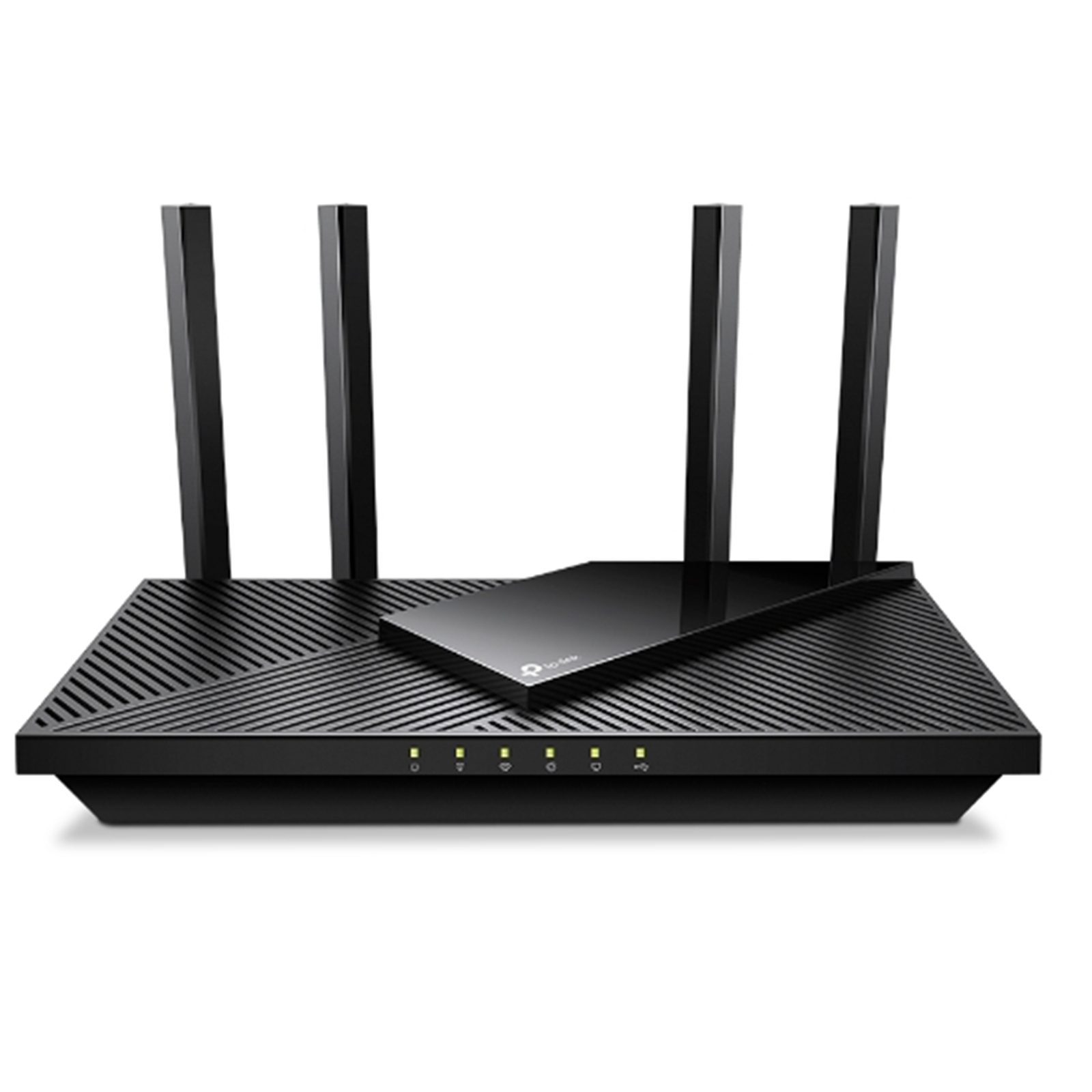
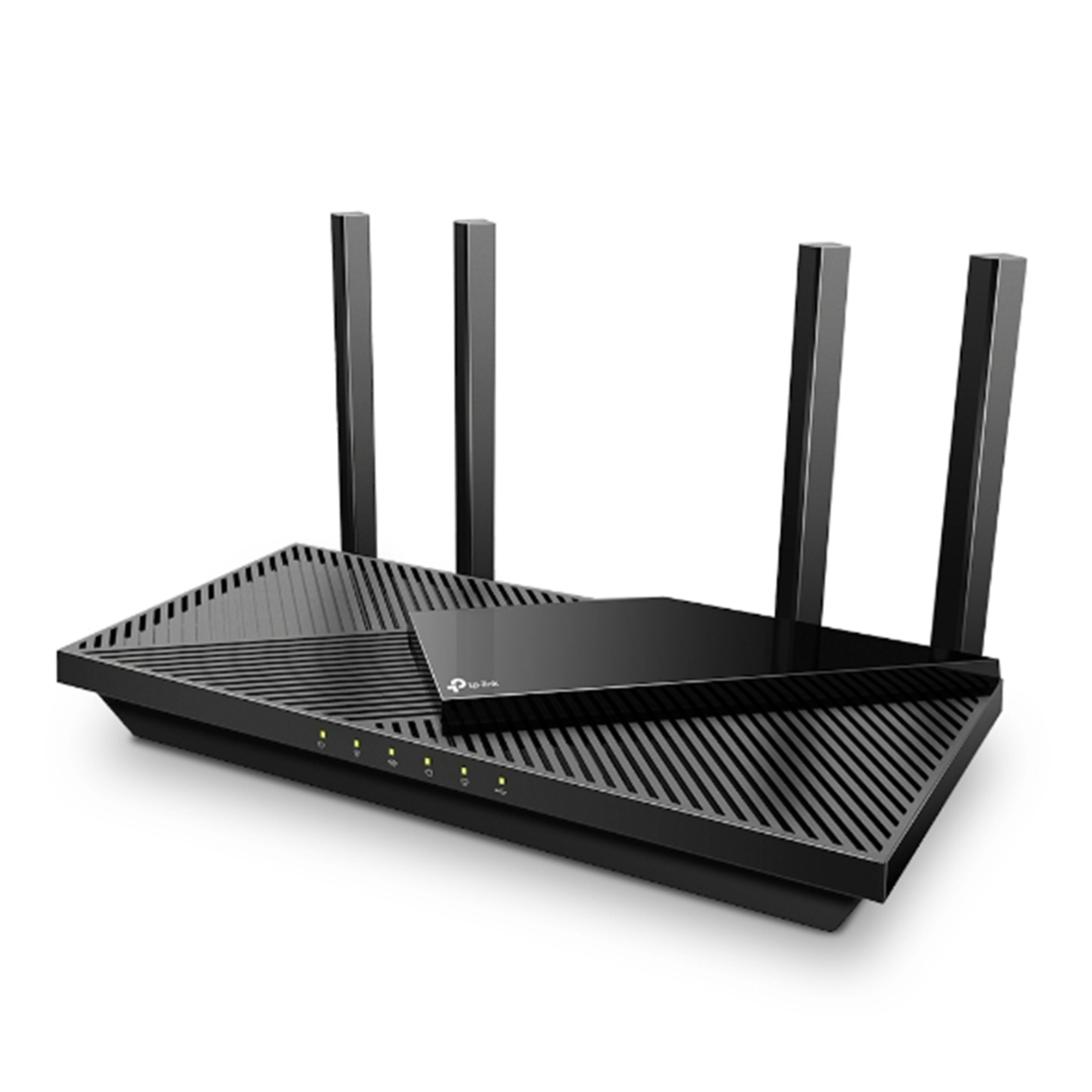
Archer AX55 Pro AX3000 Multi-Gigabit Wi-Fi 6 Router with 2.5G Port
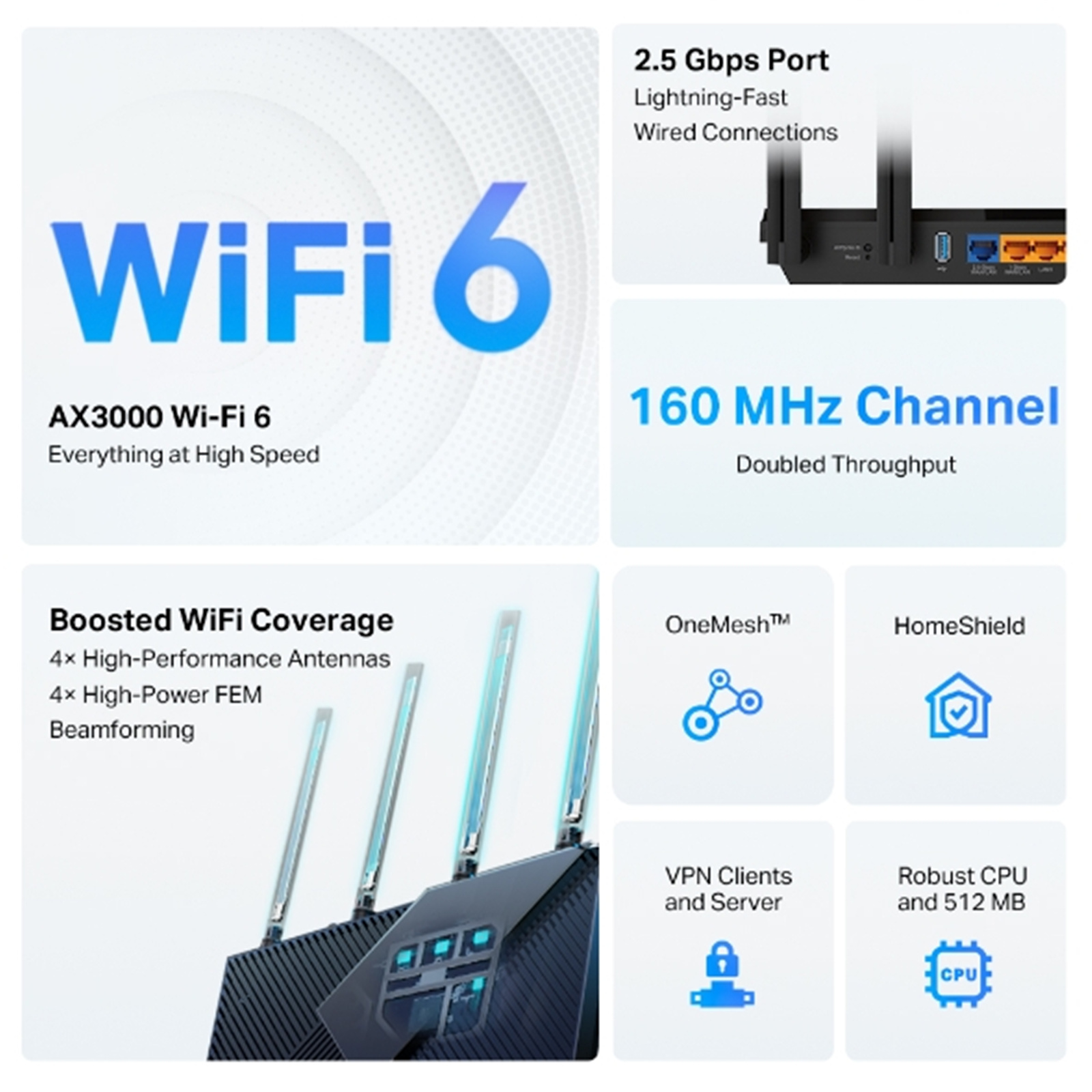
- Faster Dual-Band AX3000 WiFi: Up to 3.0 Gbps (2402 Mbps + 574 Mbps) WiFi for faster browsing, streaming and downloading, all at the same time.
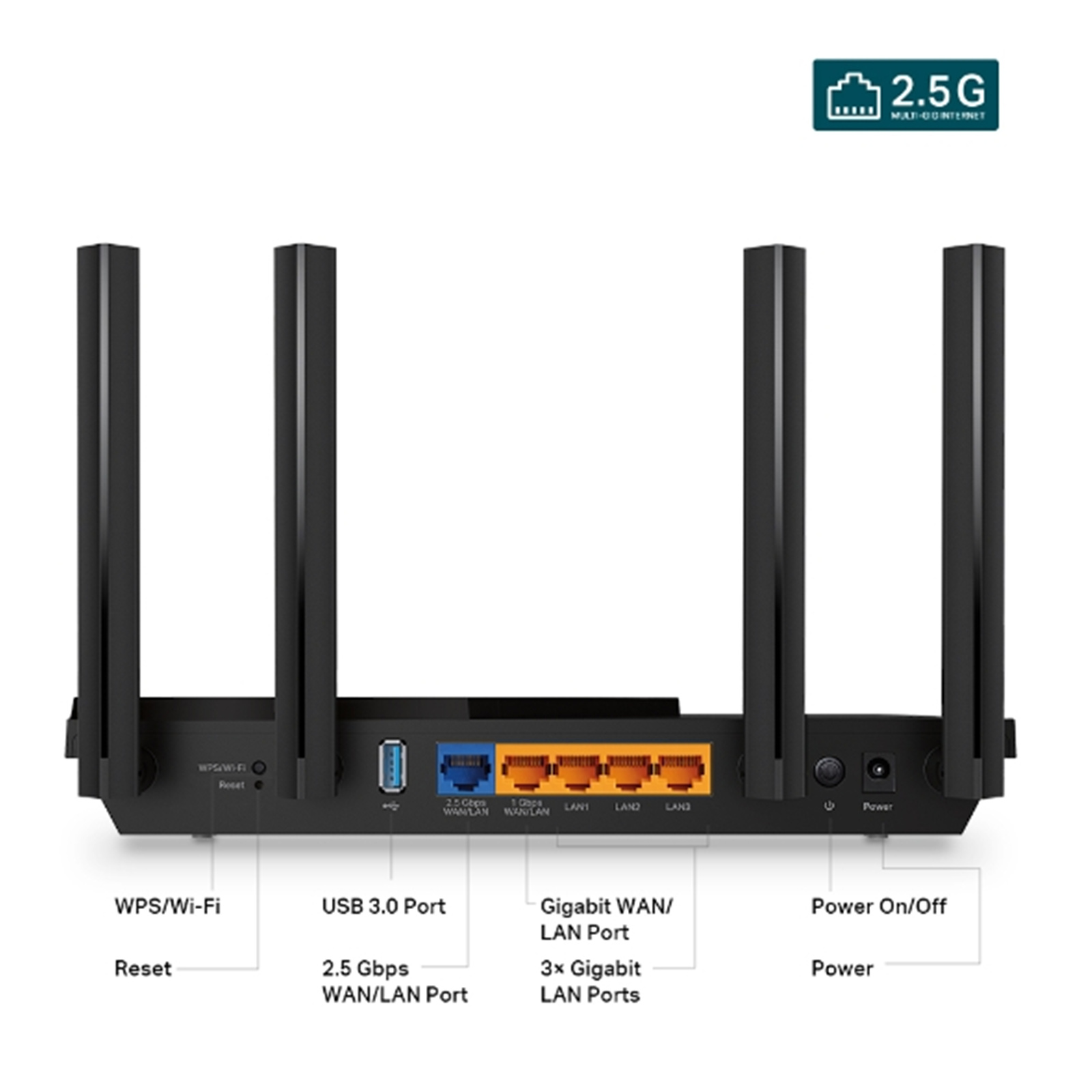
- 2.5G Multi-Gigabit Port: 1x 2.5 Gbps WAN/LAN port + 1x 1 Gbps WAN/LAN port + 3x Gigabit LAN ports + 1x USB 3.0 port ensure max flexibility and boosted throughput.
- Maximised Coverage: Four high-gain antennas equipped with Beamforming ensure vast coverage.
- Connect More Devices: OFDMA technology increases capacity by 4 times to enable simultaneous transmission to more devices.[++]
- VPN Client Supported: Allow devices in your home network to access remote VPN servers without needing to install VPN software on every device.
- TP-Link HomeShield: Enhanced security defends against the latest cyber threats.[1]
- TP-Link OneMesh Supported: Flexibly Create Whole Home WiFi with Archer AX55 Pro by adding a OneMesh supported Range Extender.
- Compatible with Alexa: Control your router via voice commands and make your life smarter and easier with Amazon Alexa.


Incredible Speed, AX3000 WiFi 6
Drastically improved WiFi 6 speeds enable streaming, fast downloading, and gaming-all at the same time. 5 GHz with 160 MHz channel support doubles the bandwidth, enabling 8K videos without lag.

Go Faster - Multi-Gig Wired Connections
In addition to incredible wireless speeds, AX55 Pro also provides premium wired connections. A 2.5 Gbps port and 1 Gbps port make full use of gigabit speeds from your local ISP. Break through the 1G bottleneck and drive your devices to peak performance. WAN/LAN support gives you remarkable flexibility to tailor both ports to fit your network's needs.

WiFi Coverage Throughout Your Home
4x high-performance antennas boost WiFi signals throughout your home. Beamforming technology detects devices and concentrates signals towards them, especially in previously hard-to-reach areas.

Massively Expanded Device Capacity, Less Loading Wheels
Enjoy smooth gaming, video streaming, and life feeds simultaneously. OFDMA makes your WiFi stronger by allowing multiple clients to share one band simultaneously, which cuts latency and jittering.

Reliable Connections and Less Latency
Enjoy fast connections with minimal latency even under the heaviest loads, thanks to the advanced Qualcomm chipset and high-speed memory. Every click on a website and response from online gaming responds quicker.

Improved Cooling Design for Full Output
No heat-ups, no throttles. A larger heat sink and refined case design cool the WiFi 6 system and enable your network to stay at top speed in more versatile environments.

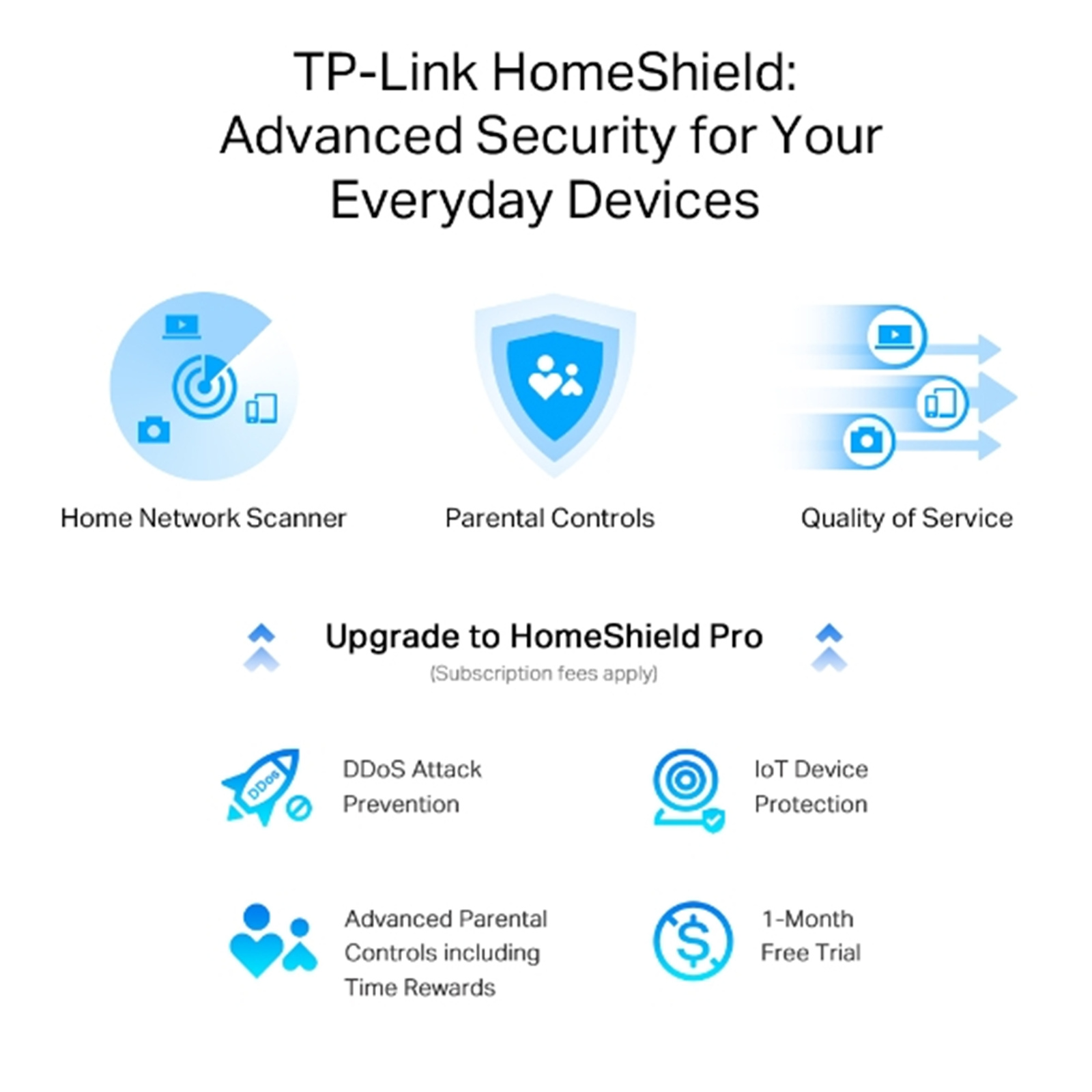
TP-Link HomeShield: Advanced Security for Your Everyday Devices
With TP-Link HomeShield, enjoy advanced security features delivering a safe environment that protects your family and network's data and privacy[1].
Home Network Scanner
Real-time network scanner to detect potential threats and security issues.

Parental Controls
Manage time online and block inappropriate content to keep your family safe online.

Quality of Service
Assign your favourite devices to have the fastest connections for top performance.

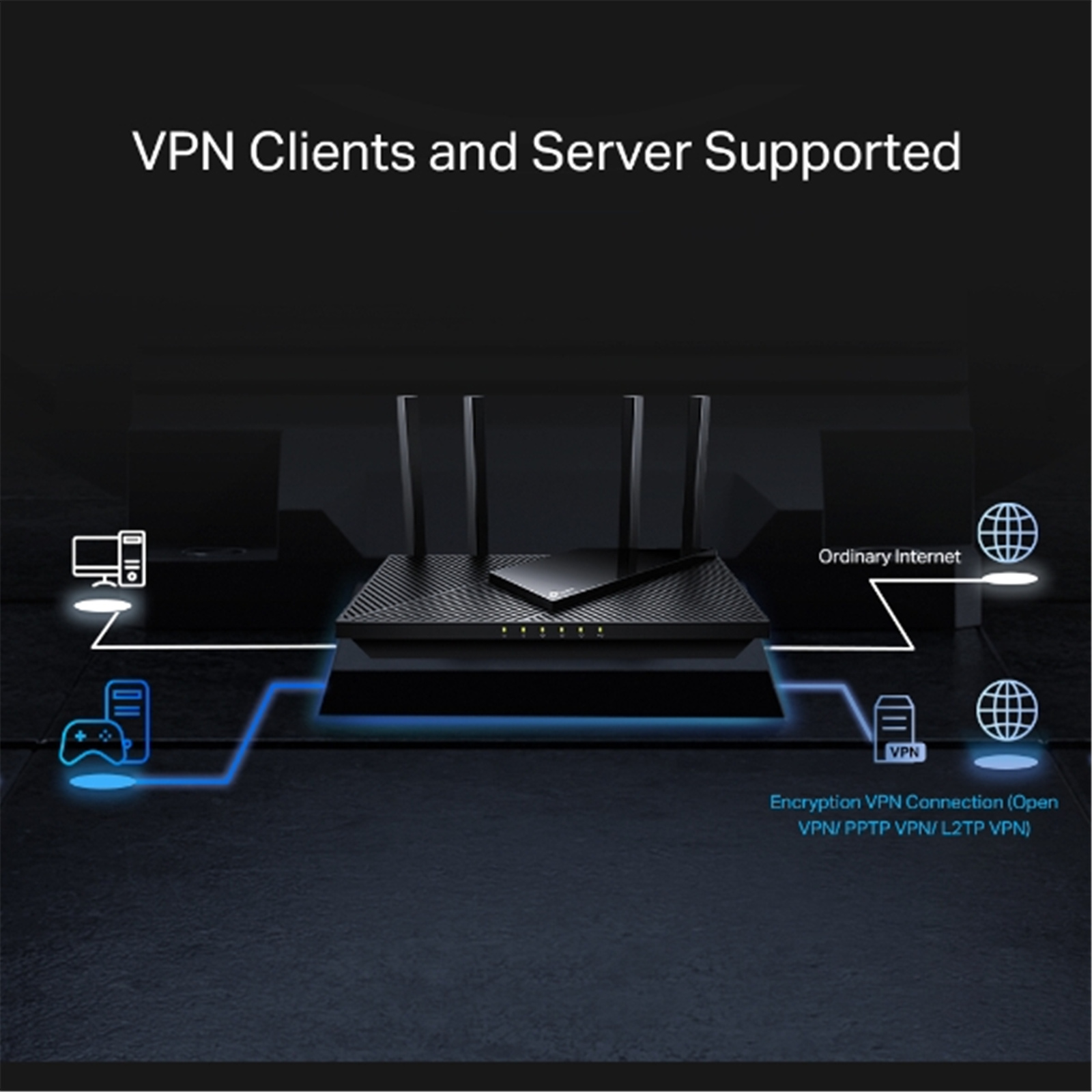
VPN Clients and Server Supported
Allow devices in your home network to access remote VPN servers without needing to install VPN software on every device. Archer AX55 Pro can run both the VPN and ordinary internet connections at the same time, delivering security and flexibility.

USB 3.0 Ports
Easily share files between connected devices by plugging them into an external drive. You can even make it your personal cloud storage and access it from outside securely.

Easy Setup and Use
Whether you prefer the intuitive Tether app or TP-Link's powerful web interface, you can set up your Archer AX55 Pro in minutes.
The Tether app allows you to manage network settings from Android or iOS devices.
Protect Your Children
Block inappropriate content for your children, and customize a time range for better online habits.

New Connection Notifications
You will be notified by your phone when new devices connect. Kick-off any suspicious connections and block them. It's as simple as that.

Easy Firmware Upgrades
Tired of upgrading firmware manually? OTA updates simplify firmware upgrades with a click in the management panel. To keep your security and functions always up to date, just turn on the auto schedule.

[+]Maximum wireless signal rates are the physical rates derived from IEEE Standard 802.11 specifications. Actual wireless data throughput, wireless coverage and number of connected devices are not guaranteed and will vary as a result of network conditions, client limitations, and environmental factors, including building materials, obstacles, volume and density of traffic, and client location.
[++]Use of 802.11ax (Wi-Fi 6) and its features including OFDMA, HE160, and TWT requires clients to also support corresponding features. The 160 MHz bandwidth may be unavailable in the 5 GHz band in some regions/countries due to regulatory restrictions. The double channel width refers to 160 MHz compared to 80 MHz for general WiFi 6 routers. Actual power reduction by Target Wake Time may vary as a result of network conditions, client limitations, and environmental factors.
[ss]The 802.11ax white paper defines standardized modifications to both the IEEE 802.11 physical layers (PHY) and the IEEE 802.11 Medium Access Control (MAC) layer as enabling at least one mode of operation capable of supporting improvement of at least four times the average throughput per station (measured at the MAC data service access point) in a dense deployment scenario.
[1]HomeShield includes the Free Basic Plan. Fees apply for the Pro Plan.
*Use of WPA3 requires clients to support WPA3.
**This router may not support all the mandatory features as ratified in IEEE 802.11ax specification.
***Further software upgrade for feature availability may be required.
Specifications
Reviews
Delivery & Pick-up
 .
.
Shipping Costs
Shipping costs vary based on your location and the items being shipped and in some cases shipping may even be FREE.
To calculate what the shipping costs will be for your order, add the items you are interested in to your cart, view the Shopping Cart page, and select your 'Delivery Area' to calculate the shipping cost.
Shipping Security and Insurance
All orders shipped by PB Tech are sent via a courier with a signature required for each delivery. In some cases, and only where you have given the courier company permission to leave orders at a designated location, your order may be delivered without requiring a signature. All orders sent by PB Tech are fully insured in the unlikely event that your item(s) are damaged or go missing in transit.
Delivery Estimates
The delivery time-frame (in days) for each product we sell is detailed on the individual product page just to the right of the main product image. From when you place your order, for DHL express delivery in-stock products typically arrive within 2-3 working days for metro areas and 3-5 working days for rural areas. For Standard delivery in-stock products typically arrive within 3-7 working days for NSW, VIC, ACT, QLD and SA deliveries and 5-10 working days for WA, TAS and NT.
Overseas Shipments
If you are located in New Zealand, you can order directly from our New Zealand site www.pbtech.co.nz. If you are from another country you can order from www.pbtech.com
Returns & Warranty
Popular WiFi 6 Routers

 ASUS RT-AX52 (AX1800) Dual-Band WiFi 6 Extendable Router 1GbE x 4

 TP-Link Archer AX55 Pro (AX3000) Dual-Band WiFi 6 Router 2.5GbE...

 Amazon eero 6+ Mesh Wi-Fi 6 Router & Extenders Fast, Affordable 1...

 Xiaomi (AX3000) Dual-Band WiFi 6 Mesh Router 4x GbE

 Amazon eero 6 Mesh Wi-Fi 6 Router & Extenders Fast 500 Mbps Wi-fi...


TP-Link Archer AX55 Pro (AX3000) Dual-Band WiFi 6 Router 2.5GbE x1 / 1GbE x4
- Brand: TP-Link
- MPN: Archer AX55 Pro
- Part #: NETTPL6056
Product URL: https://www.pbtech.com/au/product/NETTPL6056/category/help?pg=2
Features
Archer AX55 Pro AX3000 Multi-Gigabit Wi-Fi 6 Router with 2.5G Port
- Faster Dual-Band AX3000 WiFi: Up to 3.0 Gbps (2402 Mbps + 574 Mbps) WiFi for faster browsing, streaming and downloading, all at the same time.
- 2.5G Multi-Gigabit Port: 1x 2.5 Gbps WAN/LAN port + 1x 1 Gbps WAN/LAN port + 3x Gigabit LAN ports + 1x USB 3.0 port ensure max flexibility and boosted throughput.
- Maximised Coverage: Four high-gain antennas equipped with Beamforming ensure vast coverage.
- Connect More Devices: OFDMA technology increases capacity by 4 times to enable simultaneous transmission to more devices.[++]
- VPN Client Supported: Allow devices in your home network to access remote VPN servers without needing to install VPN software on every device.
- TP-Link HomeShield: Enhanced security defends against the latest cyber threats.[1]
- TP-Link OneMesh Supported: Flexibly Create Whole Home WiFi with Archer AX55 Pro by adding a OneMesh supported Range Extender.
- Compatible with Alexa: Control your router via voice commands and make your life smarter and easier with Amazon Alexa.
Incredible Speed, AX3000 WiFi 6
Drastically improved WiFi 6 speeds enable streaming, fast downloading, and gaming-all at the same time. 5 GHz with 160 MHz channel support doubles the bandwidth, enabling 8K videos without lag.
Go Faster - Multi-Gig Wired Connections
In addition to incredible wireless speeds, AX55 Pro also provides premium wired connections. A 2.5 Gbps port and 1 Gbps port make full use of gigabit speeds from your local ISP. Break through the 1G bottleneck and drive your devices to peak performance. WAN/LAN support gives you remarkable flexibility to tailor both ports to fit your network's needs.
WiFi Coverage Throughout Your Home
4x high-performance antennas boost WiFi signals throughout your home. Beamforming technology detects devices and concentrates signals towards them, especially in previously hard-to-reach areas.
Massively Expanded Device Capacity, Less Loading Wheels
Enjoy smooth gaming, video streaming, and life feeds simultaneously. OFDMA makes your WiFi stronger by allowing multiple clients to share one band simultaneously, which cuts latency and jittering.
Reliable Connections and Less Latency
Enjoy fast connections with minimal latency even under the heaviest loads, thanks to the advanced Qualcomm chipset and high-speed memory. Every click on a website and response from online gaming responds quicker.
Improved Cooling Design for Full Output
No heat-ups, no throttles. A larger heat sink and refined case design cool the WiFi 6 system and enable your network to stay at top speed in more versatile environments.
TP-Link HomeShield: Advanced Security for Your Everyday Devices
With TP-Link HomeShield, enjoy advanced security features delivering a safe environment that protects your family and network's data and privacy[1].
Home Network Scanner
Real-time network scanner to detect potential threats and security issues.
Parental Controls
Manage time online and block inappropriate content to keep your family safe online.
Quality of Service
Assign your favourite devices to have the fastest connections for top performance.
VPN Clients and Server Supported
Allow devices in your home network to access remote VPN servers without needing to install VPN software on every device. Archer AX55 Pro can run both the VPN and ordinary internet connections at the same time, delivering security and flexibility.
USB 3.0 Ports
Easily share files between connected devices by plugging them into an external drive. You can even make it your personal cloud storage and access it from outside securely.
Easy Setup and Use
Whether you prefer the intuitive Tether app or TP-Link's powerful web interface, you can set up your Archer AX55 Pro in minutes.
The Tether app allows you to manage network settings from Android or iOS devices.
Protect Your Children
Block inappropriate content for your children, and customize a time range for better online habits.
New Connection Notifications
You will be notified by your phone when new devices connect. Kick-off any suspicious connections and block them. It's as simple as that.
Easy Firmware Upgrades
Tired of upgrading firmware manually? OTA updates simplify firmware upgrades with a click in the management panel. To keep your security and functions always up to date, just turn on the auto schedule.
[+]Maximum wireless signal rates are the physical rates derived from IEEE Standard 802.11 specifications. Actual wireless data throughput, wireless coverage and number of connected devices are not guaranteed and will vary as a result of network conditions, client limitations, and environmental factors, including building materials, obstacles, volume and density of traffic, and client location.
[++]Use of 802.11ax (Wi-Fi 6) and its features including OFDMA, HE160, and TWT requires clients to also support corresponding features. The 160 MHz bandwidth may be unavailable in the 5 GHz band in some regions/countries due to regulatory restrictions. The double channel width refers to 160 MHz compared to 80 MHz for general WiFi 6 routers. Actual power reduction by Target Wake Time may vary as a result of network conditions, client limitations, and environmental factors.
[ss]The 802.11ax white paper defines standardized modifications to both the IEEE 802.11 physical layers (PHY) and the IEEE 802.11 Medium Access Control (MAC) layer as enabling at least one mode of operation capable of supporting improvement of at least four times the average throughput per station (measured at the MAC data service access point) in a dense deployment scenario.
[1]HomeShield includes the Free Basic Plan. Fees apply for the Pro Plan.
*Use of WPA3 requires clients to support WPA3.
**This router may not support all the mandatory features as ratified in IEEE 802.11ax specification.
***Further software upgrade for feature availability may be required.
Specifications
WIRELESS
Standards
Wi-Fi 6:
IEEE 802.11ax/ac/n/a 5 GHz
IEEE 802.11ax/n/b/g 2.4 GHz
WiFi Speeds
AX3000:
5 GHz: 2402 Mbps (802.11ax, HE160)
2.4 GHz: 574 Mbps (802.11ax)
WiFi Range
3 Bedroom Houses:
4× Fixed High-Performance Antennas
Multiple antennas form a signal-boosting array to cover more directions and large areas
Beamforming
Concentrates wireless signal strength towards clients to expand WiFi range
High-Power FEM
Improves transmission power to strengthen signal coverage
WiFi Capacity
High:
Dual-Band
Allocate devices to different bands for optimal performance
OFDMA
Simultaneously communicates with multiple Wi-Fi 6 clients
Airtime Fairness
Improves network efficiency by limiting excessive occupation
DFS
Access an extra band to reduce congestion
4 Streams
Connect your devices to more bandwidth
Working Modes
Router Mode
Access Point Mode
HARDWARE
Ethernet Ports
1× 2.5 Gigabit WAN/LAN Port
1× Gigabit WAN/LAN Port
3× Gigabit LAN Ports
USB Support
1× USB 3.0 Port
Supported Partition Formats:
NTFS, exFAT, HFS+, FAT32
Supported Functions:
Apple Time Machine
FTP Server
Media Server
Samba Server
Buttons
Wi-Fi/WPS Button
Power On/Off Button
Reset Button
Power
12 V/ 2 A (US Version)
12 V/ 1.5 A (EU Version)
SECURITY
WiFi Encryption
WPA3*
WPA2
WPA
WPA/WPA2-Enterprise (802.1x)
Network Security
SPI Firewall
Access Control
IP & MAC Binding
Application Layer Gateway
HomeShield Security:
Real-Time IoT Protection
Malicious Site Blocker
Intrusion Prevention System
DDoS Attack Prevention
Home Network Scanner
Guest Network
1× 5 GHz Guest Network
1× 2.4 GHz Guest Network
VPN Server
OpenVPN
PPTP
L2TP
VPN Client
OpenVPN
PPTP
L2TP
SOFTWARE
Protocols
IPv4
IPv6
Service Kits
HomeShield
OneMesh™
OneMesh™ Supported
Without replacing your existing devices or buying a whole new WiFi ecosystem, OneMesh™ helps you create a more flexible network that covers your entire home with TP-Link OneMesh™ products.
Parental Controls
HomeShield Parental Controls:
Custom Profiles
Professional Content Filter Library
Family Time
Bedtime
Off Time
Time Rewards
Family Online Time Ranking
Pause the Internet
Weekly and Monthly Reports
WAN Types
Dynamic IP
Static IP
PPPoE
PPTP
L2TP
Quality of Service
QoS by Device
Cloud Service
Auto Firmware Upgrade
OTA Firmware Upgrade
TP-Link ID
DDNS
NAT Forwarding
Port Forwarding
Port Triggering
DMZ
UPnP
IPTV
IGMP Proxy
IGMP Snooping
Bridge
Tag VLAN
DHCP
Address Reservation
DHCP Client List
Server
DDNS
TP-Link
NO-IP
DynDNS
Management
Tether App
Webpage
OTHER
System Requirements
Internet Explorer 11+, Firefox 12.0+, Chrome 20.0+, Safari 4.0+, or other JavaScript-enabled browser
Cable or DSL Modem (if needed)
Subscription with an internet service provider (for internet access)
Certifications
FCC, CE, RoHS
Environment
Operating Temperature: 0~40C (32 ~104F)
Operating Humidity: 10%~90% non-condensing
TEST DATA
WiFi Transmission Power
CE:
<20dBm(2.4GHz)
<23dBm (5.15GHz~5.25GHz & 5.25GHz~5.35GHz)
<30dBm (5.47GHz~5.725GHz)
FCC:
<30dBm (2.4GHz)
<30dBm(5.15GHz~5.25GHz&5.725GHz~5.850GHz)
<24dBm (5.25GHz~5.35GHz&5.47GHz~5.725GHz)
WiFi Reception Sensitivity
2.4 GHz:
11ac VHT20 MCS0:-97dBm, 11ac VHT20 MCS11: -74dBm,
11ac VHT40 MCS0: -93dBm, 11ac VHT40 MCS11: -70dBm,
11ax HE20 MCS0: -96dBm, 11ax HE20 MCS11: -66dBm,
11ax HE40 MCS0: -93dBm, 11ac HE40 MCS11: -63dBm
5 GHz:
11ac VHT20 MCS0: -97dBm, 11ac VHT20 MCS11: -74dBm,
11ac VHT40 MCS0: -93dBm, 11ac VHT40 MCS11: -69dBm,
11ac VHT80 MCS0: -90dBm, 11ac VHT80 MCS11: -65dBm,
11ax HE20 MCS0: -97dBm, 11ax HE20 MCS11: -66dBm,
11ax HE40 MCS0: -94dBm, 11ax HE40 MCS11: -63dBm,
11ax HE80 MCS0: -90dBm, 11ax HE80 MCS11: -61dBm,
11ax HE160 MCS0: -87dBm, 11ax HE160 MCS11: -58dBm
PHYSICAL
Dimensions (W×D×H)
10.2 × 5.3 × 1.5 in
(261.1 × 134.5 × 41.0 mm)
Package Contents
Wi-Fi
Router Archer AX55 Pro
Power Adapter
RJ45 Ethernet Cable
Quick Installation Guide
